Froggy Weather
- 4.1
- Rating
- 100.00K
- Installs
- Free
- Price

 Analysis by App-foxy
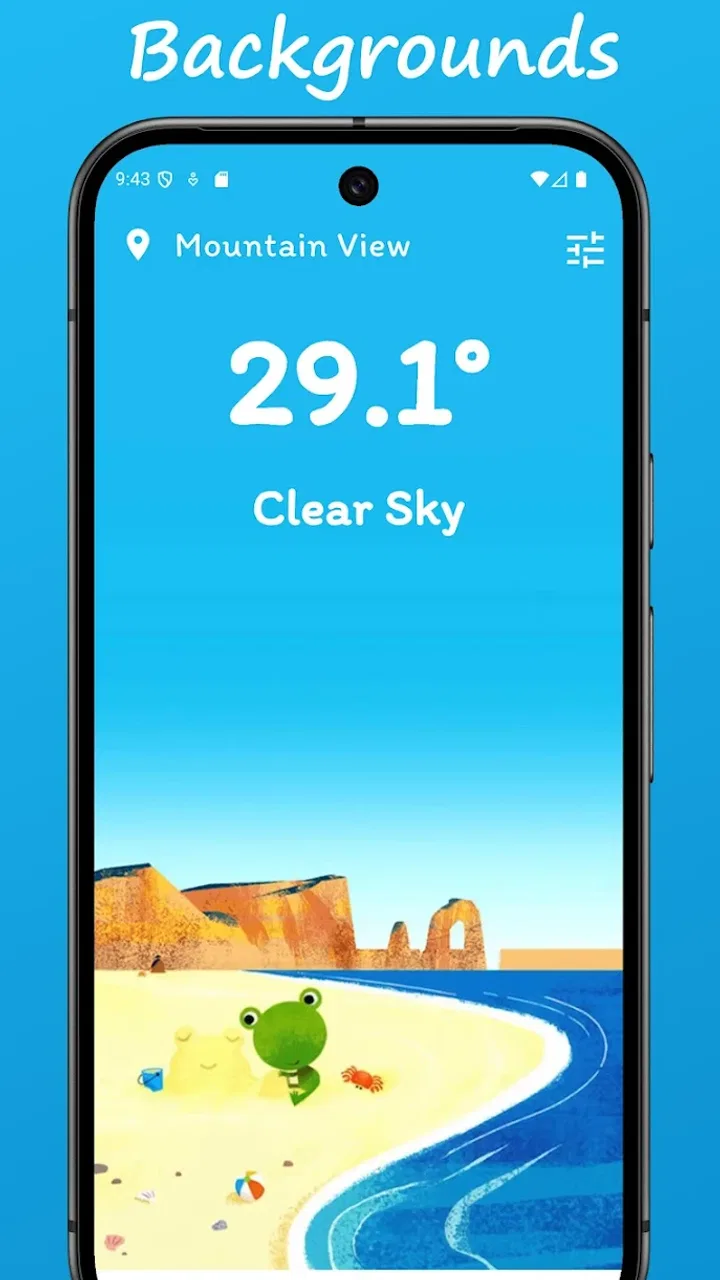
I tried Froggy Weather with a very ordinary goal: decide what to wear, whether to carry an umbrella, and if an outdoor plan was worth keeping. That sounds like a small job, but weather apps often turn it into a crowded screen full of radar layers, alerts, charts, and settings. This app takes a gentler route. It is a free weather app from JaePeaTea, built around Google's cute frog backgrounds, and its personality is immediately clear: it wants the forecast to feel friendly rather than technical.
That simplicity is both its appeal and its boundary. I found it pleasant for quick checks, especially when I wanted a fast visual answer instead of a detailed meteorological report. At the same time, people who depend on advanced maps, severe-weather tools, or highly configurable forecasts may find the experience too limited. My review focuses on the complete everyday workflow: opening the app, reading the information, passing that information into a decision, and noticing the points where the process becomes less convenient.
From a vague weather question to a practical decision
The starting condition for most users will not be “I want to explore a weather dashboard.” It will be something like “I have to leave in ten minutes” or “Can I plan a walk this afternoon?” Froggy Weather fits that moment because the visual design does not make the first step feel like work. The frog imagery gives the screen a recognizable identity, while the weather information remains the reason for opening it.
You May Also Like

 Blood Strike: 2.5 Anniversary
Blood Strike’s Loadouts Turn Every Drop Into a Tactical Gamble
A close look at Blood Strike’s custom loadouts: how fast access to signature weapons reshapes its battle royale rhythm, rewards preparation, and narrows the gap between fights.

 Pandora - Music & Podcasts
Pandora’s Music Is Easy to Start, but Harder to Recover
Pandora’s strength is its low-effort path from a seed to a station. Its weak spot is how much confidence it asks you to place in connection, setup, and quiet recovery.

 8 Ball Pool
 Is Built on Rivalries, Rematches, and Routine
A close look at the rivalries, rematches, shared routines, and unanswered safety questions that turn a quick pool match into a persistent mobile community.

 Samsung Music
’s Quiet Strength Is Playing What You Already Own
Its reach comes less from spectacle than from dependable access to a personal library. That simplicity is both the app’s strongest retention engine and its ceiling.

 AccuWeather: Weather Radar
AccuWeather Review: A Quick, Clear Forecast for Everyday Decisions
For everyday plans, the best forecast is the one you can understand quickly. AccuWeather makes rain timing, radar, and local conditions easy to act on, with a few trade-offs.

 Hill Climb Racing
Why Hill Climb Racing Still Turns Crashes Into One More Run
A tiny car, a bumpy hill and one more upgrade: Hill Climb Racing keeps resurfacing because its simple chaos makes every near-miss feel personal.
More From Our News Desk



I especially like that the app does not present itself as a replacement for every kind of weather service. Its store summary describes a simple experience, and that is the right way to approach it. If I only need a quick sense of the conditions, a lightweight interface can be more useful than a powerful one that asks me to interpret several panels before I find the answer.
The app is suitable for Everyone, which matches the approachable presentation. I can imagine it working well for a family tablet, a casual phone user, or anyone who finds conventional weather apps visually tiring. The cute theme is not merely decoration; it lowers the seriousness of the first interaction. Weather information can still be important, but the app does not make checking it feel like opening an instrument panel.
There is also a practical advantage to having a clear visual theme. When several apps are installed, a distinctive frog background makes this one easy to recognize. That matters during a rushed morning when I am not trying to compare services. I open it for a single answer, read the screen, and move on. The trade-off is that a playful look may not appeal to users who prefer a neutral, professional presentation.
What I look for before trusting a quick forecast
My first habit is to separate the visual mood from the actual decision. A cute background can make an app enjoyable, but it should not be the only reason I trust it. I check the displayed conditions, then ask whether the information is enough for the decision in front of me. For choosing a jacket, it usually is. For deciding whether to travel through a storm or organize a long outdoor event, I would want a more comprehensive source as well.
This is one of the most useful ways to use the app: treat it as a fast first read. It can answer the small question that starts the workflow, while a more specialized weather service can handle the high-consequence follow-up. That division keeps Froggy Weather in a role it handles well instead of asking it to become something it was not designed to be.
The app has reached over one hundred thousand installs and holds a 3.7 average from around nine hundred ratings, with roughly one hundred thirty written reviews. Those figures suggest a real audience, but they do not remove the need for personal judgment. I would not choose it because of popularity alone. I would choose it because the combination of a simple weather view and frog artwork suits the way I want to check conditions.
My step-by-step morning workflow
My typical routine starts before breakfast. I open the app, let the current view orient me, and identify the information that affects the next few hours. I am not looking for a long explanation. I want to know whether the day looks comfortable, wet, cold, or unsettled enough to change my plan. The app's compact approach makes this first pass feel natural.
Next, I turn that reading into a small checklist: clothing, transport, and timing. If the conditions look wet, the umbrella goes into my bag before I leave. If the day looks suitable for walking, I may choose to walk part of the route instead of taking a vehicle. If the forecast looks uncertain or potentially severe, I stop treating the app as the final authority and check a more detailed service before committing.
That last step is important because a simple weather app can encourage overconfidence. A clean screen is not the same as complete information. Froggy Weather is strongest when I use it to reduce everyday friction, not when I expect it to replace every forecast tool on my phone. The app helps me make a quick decision; it does not need to own the entire decision-making process.
A useful tip is to check the app at the point when the forecast can still change your behavior. Looking at it after I have already left is less valuable than checking while I am packing. This sounds obvious, but the app's easygoing design makes it tempting to browse casually. I get better results when I use it as a deliberate checkpoint: open, read, decide, and close.
Passing the information into real life
The handoff from the app to the rest of my day is simple but revealing. Froggy Weather does not need to be part of a complicated planning system to be useful. I read the conditions and pass them into a physical action: selecting shoes, changing a route, moving an appointment outdoors, or deciding to bring an extra layer. Its value comes from shortening the distance between forecast and behavior.
For example, imagine I am leaving for work and meeting a friend later for a walk. The first check tells me whether the commute needs rain protection. The second check helps me decide whether the walk should remain outdoors. If the outlook is comfortable, the app has done its job in seconds. If it looks questionable, I use that signal to investigate further instead of blindly proceeding.
This workflow also works for parents and caregivers. A quick glance can inform whether a child needs a coat or whether outdoor play should be adjusted. The friendly visuals may make the app less intimidating for someone who does not enjoy reading weather symbols. Still, I would pair it with a more authoritative source for warnings or unusual conditions, particularly when another person's safety depends on the decision.
Another non-obvious strength is its role as a shared reference point. When someone asks, “What is the weather doing today?” I can check the same simple view rather than explaining a complicated chart. That makes the handoff conversational. The app is not trying to turn me into a weather analyst; it gives me enough context to communicate a basic plan.
Where it differs from the usual weather alternatives
Compared with a phone's built-in weather screen, Froggy Weather feels more characterful. The frog backgrounds give the experience a sense of place and make a routine check more memorable. A default weather widget may be faster for someone who wants information without opening an app, but Froggy Weather is more appealing to a user who enjoys a dedicated visual presentation.
Compared with full-featured weather services, the difference is even clearer. Those alternatives are generally better suited to radar inspection, detailed storm tracking, extended planning, and users who want many layers of context. Froggy Weather is better suited to the opposite situation: I want a calm, uncomplicated glance and do not want to navigate a technical dashboard.
There is no universal winner here. A cyclist planning a long route, a traveler monitoring changing conditions, or someone living in an area with frequent severe weather may reasonably prefer a richer service. A person who checks the weather mainly to choose clothing or decide whether to walk may appreciate Froggy Weather more than an app overloaded with information.
The key trade-off is speed against depth. The more information an app exposes, the more time I may spend interpreting it. Froggy Weather reduces that burden, but the reduced burden comes from keeping the experience simple. I would not criticize it for failing to behave like a radar platform; I would criticize it only if I expected it to be one.
Version, access, and the practical setup
Froggy Weather is currently at version 2.0.5 and runs on Android 7.0 or later. That gives it a broad reach across older Android devices, which is useful for people who keep a phone for several years rather than upgrading frequently. I tested the app with the mindset of a casual user, and that compatibility makes the choice less demanding from a hardware perspective.
It is free to use, so the initial decision is straightforward: install it and see whether the visual style and level of detail fit your routine. I like that this lowers the cost of experimentation. A person can try it as a secondary weather tool without first committing money or rebuilding their entire daily setup.
The developer, JaePeaTea, has chosen a focused identity rather than a broad utility package. That focus is visible in the frog-led presentation. It gives the app a stronger personality than a generic weather interface, but it also means the experience will be judged heavily on whether users enjoy that personality. If you want weather information to disappear into the background, the theme may feel unnecessary.
One practical setup suggestion is to decide in advance what role the app will play. I would use it as my quick morning check, a visual forecast for casual plans, or a simple tool for children and less technical users. I would not make it the only app involved in safety-sensitive travel decisions. Defining that role prevents disappointment and makes the app easier to evaluate fairly.
Where the workflow breaks down
The first point of friction is the limit of simplicity. When my question becomes more specific than “What is the weather like?”, I may need another source. Planning a long outing can require details that a quick glance does not provide. The app's friendly presentation cannot compensate for information that is not part of the experience I need.
The second issue is the possibility of misreading confidence as certainty. A visually pleasant forecast can feel reassuring, but weather changes and local conditions can complicate a simple summary. I have to keep my own judgment active, especially when the consequences of being wrong are more serious than getting slightly wet or wearing the wrong layer.
The third limitation is personal taste. The frog backgrounds are the central visual idea, and that will divide users. I find them charming, but someone seeking a restrained, data-first interface may see them as visual noise. The same design decision that makes the app memorable can make it unsuitable for a professional or highly technical workflow.
There is also a workflow break when the app becomes part of a larger planning chain. If I need to move information into a calendar, coordinate with several people, or compare multiple locations, a simple weather view may no longer be enough on its own. In that situation, I would keep Froggy Weather for the quick check and switch to a more capable alternative for the coordination work.
These are not reasons to dismiss the app. They are boundaries that become clear once I use it honestly. The best experience comes from accepting that it is a focused weather companion, not a universal forecasting workstation. Its success depends on matching the tool to the size of the question.
The result after using it as intended
For my everyday workflow, the result is pleasantly direct. I can open the app, take in the conditions, and turn that information into a decision without feeling buried under controls. The frog backgrounds give the check a little warmth, while the weather purpose remains easy to understand. That balance is the main reason I would recommend trying it.
I would recommend Froggy Weather to someone who wants a free, approachable weather app with a distinctive visual style and a low-effort routine. It is particularly suitable for quick clothing decisions, casual walks, family use, and people who prefer a friendly screen to a dense technical dashboard. It also makes sense as a secondary app for users who already have a detailed weather service but want something lighter for ordinary checks.
I would skip it if my daily needs revolve around advanced weather analysis, detailed outdoor planning, or frequent monitoring of dangerous conditions. In those cases, a conventional full-featured weather service is the better primary choice. I would also skip it if the frog theme feels distracting rather than enjoyable; the central design idea is too important to ignore.
My final opinion is positive but specific: Froggy Weather is best when the goal is a quick, friendly weather decision. It does not need to compete with every alternative because its appeal comes from doing less and making that smaller task pleasant. If your usual forecast question is simple, the app can make the answer feel easier to reach. If your question is complex, use it as the first step, then hand the job to a more detailed tool.
That clear division of labor is what makes the app useful in practice. I open it for orientation, carry the result into a real choice, and know when the workflow has reached its limit. For a free weather app with a playful identity, that is a sensible and enjoyable outcome.
FAQs for Froggy Weather
01What features does Froggy Weather offer?
Froggy Weather provides real-time weather updates, detailed forecasts, and customizable alerts. It includes features like radar maps, precipitation predictions, and a unique froggy-themed interface. Users can personalize their experience with various skins and widgets, making it not only functional but also visually appealing. The app ensures you stay informed with accurate weather data.
02Is Froggy Weather available for both Android and iOS?
Yes, Froggy Weather is available for download on both Android and iOS platforms. You can find it on the Google Play Store for Android devices and the Apple App Store for iOS devices. Ensure your device meets the app’s minimum requirements for a smooth installation and optimal performance.
03Does Froggy Weather require a subscription for full access?
Froggy Weather is free to download and provides access to basic weather features. However, it offers a premium subscription that unlocks additional features such as advanced radar maps, ad-free experience, and extended forecasts. The subscription is optional and caters to users who want a more comprehensive weather tracking experience.
04How accurate is the weather data provided by Froggy Weather?
Froggy Weather sources its data from reputable meteorological services to ensure high accuracy. The app updates frequently to provide real-time information and uses sophisticated algorithms to deliver precise forecasts. User feedback consistently praises its reliability, making it a trusted choice for weather updates.
05Can I customize alerts and notifications in Froggy Weather?
Yes, Froggy Weather allows for extensive customization of alerts and notifications. Users can set specific conditions, such as temperature changes, rain forecasts, or severe weather alerts, to receive timely notifications. This feature is designed to help users stay informed and prepared for any weather changes throughout the day.
Pros
- Intuitive interface with playful graphics.
- Accurate weather forecasts updated frequently.
- Customizable alerts for severe weather.
- Supports multiple locations for tracking.
- Lightweight app that runs smoothly.
Cons
- Limited widget customization options.
- No offline mode for forecast access.
- Ads can be intrusive at times.
- Lacks detailed radar imagery.
- Premium features require subscription.

Froggy Weather
Gallery